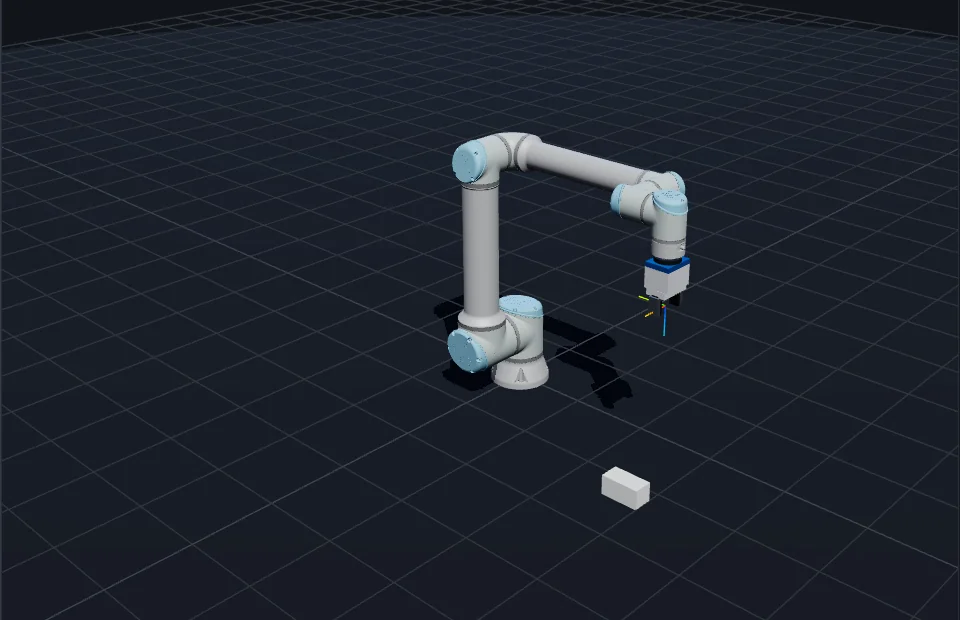
An interactive, user-controllable 3D simulation of a Universal Robots UR10e, built with Three.js and running entirely in the browser. It exists so students can rehearse a programme before booking time on the real arm in the TH OWL robotics lab — same motion limits, same collision behaviour, same protective stop, no risk to the hardware.
The arm renders with the official Universal Robots graphical-documentation mesh, meshopt-compressed to 2.1 MB. A lightweight primitive skin appears instantly and is swapped out once the real mesh loads, so the page is usable before the download finishes.
- Three.jsRendering · scene graph · GLB loading
- three-mesh-bvhExact mesh-distance collision queries
- PyodideClient-side Python for the code lab
- Type
- Individual project
- Context
- TH OWL robotics lab
- Built with
- Three.js, JavaScript, Pyodide, Vite
- Licence
- MIT
- Live demo
- ur10e-simulator
Kinematics — exact, not approximate
The joint chain is built from the official UR10e DH parameters, so forward kinematics match the real controller. A headless smoke test verifies the scene graph against the analytic DH product and the published zero-pose flange position; a second test proves every link of the official mesh registers onto the DH chain within 0.05 mm. Registration is computed rather than hand-tuned.
Kinematics are derived from the scene graph itself and numerically differentiated for the Jacobian, so the maths can never drift from what is on screen. Cartesian jog runs through damped-least-squares IK.
export const SPECS = {
  name: 'UR10e',
  reach: 1.3,
  payload: 12.5,
  dh: [
    { d: 0.1807, a: 0, alpha: Math.PI / 2 },
    { d: 0, a: -0.6127, alpha: 0 },
    { d: 0, a: -0.57155, alpha: 0 },
    { d: 0.17415, a: 0, alpha: Math.PI / 2 },
    { d: 0.11985, a: 0, alpha: -Math.PI / 2 },
    { d: 0.11655, a: 0, alpha: 0 },
  ],
  joints: [
    { name: 'Base', min: rad(-360), max: rad(360), vmax: rad(120), amax: rad(300) },
    { name: 'Shoulder', min: rad(-360), max: rad(360), vmax: rad(120), amax: rad(300) },
    { name: 'Elbow', min: rad(-180), max: rad(180), vmax: rad(180), amax: rad(300) },
    { name: 'Wrist 1', min: rad(-360), max: rad(360), vmax: rad(180), amax: rad(350) },
    { name: 'Wrist 2', min: rad(-360), max: rad(360), vmax: rad(180), amax: rad(350) },
    { name: 'Wrist 3', min: rad(-360), max: rad(360), vmax: rad(180), amax: rad(350) },
  ],
  home: [0, -90, -90, -90, 90, 0].map(rad),
};
Motion and safety
Per-joint velocity limits and acceleration-limited trapezoidal profiles mean joints ramp up, cruise and decelerate into targets without overshoot. The trick is one square root: an axis may only move as fast as it could still stop in the distance left, √(2·a·d), so it arrives at its target instead of sailing past it.
    const ov = this.speed;
    const running = this.state === 'RUNNING';
    for (const ax of this.axes) {
      let vDes = 0;
      if (running) {
        if (ax.jogDir !== 0) {
          vDes = ax.jogDir * ax.vmax * ov;
        } else if (ax.target != null) {
          const err = ax.target - ax.q;
          if (Math.abs(err) < 5e-4 && Math.abs(ax.v) < 0.02) {
            ax.q = ax.target;
            ax.target = null;
            ax.v = 0;
            continue;
          }
          // decel-limited approach speed toward target
          const vCap = Math.sqrt(2 * ax.amax * Math.abs(err));
          vDes = Math.sign(err) * Math.min(vCap, ax.vmax * ov);
        }
      }
      // accelerate toward desired velocity
      const dv = vDes - ax.v;
      const maxDv = ax.amax * dt * (running ? 1 : 3);
      ax.v += Math.abs(dv) > maxDv ? Math.sign(dv) * maxDv : dv;
      ax.q += ax.v * dt;

      ax.atLimit = false;
      if (ax.q <= ax.min) { ax.q = ax.min; ax.v = 0; ax.atLimit = true; }
      if (ax.q >= ax.max) { ax.q = ax.max; ax.v = 0; ax.atLimit = true; }
    }
Self-collision, floor and track-rail checks run true distance queries against a simplified copy of the real link meshes with a 5 mm clearance, so the stop fires exactly when the visible surfaces meet. A predicted collision reverts to the last safe pose and latches a protective stop — press Reset to resume, exactly like a real UR.
  const hit = collider.check(manager.staticObstacles);
  if (hit) {
    if (motion.state === 'RUNNING') {
      // revert to the last safe pose and latch a protective stop
      motion.setPositions(safeQ);
      motion.apply();
      robot.root.updateMatrixWorld(true);
      motion.protectiveStop(hit);
    }
  } else if (motion.state !== 'EMERGENCY_STOP') {
    safeQ = motion.getPositions();
  }
Code lab
The pendant’s Code tab runs student programmes against the simulated robot. Python scripts written for ur_rtde run unmodified — rtde_control, rtde_receive and dashboard_client are mocked in-browser via Pyodide, so moveJ, moveL, servoJ and state reads all behave. Output and tracebacks stream to a built-in console, and common beginner mistakes get targeted hints: degrees versus radians, millimetres versus metres, desktop-only imports, runaway loops.
The hints come from reading the numbers, not the code. A joint target outside the arm’s limits is an error either way, but one larger than a full turn is almost certainly degrees — so the message says so, and names the function that fixes it.
  _checkLimits(q, what) {
    const lim = this._limits();
    for (let i = 0; i < 6; i++) {
      if (!Number.isFinite(q[i])) throw new Error(`${what}: joint ${i + 1} value is not a number`);
      if (q[i] < lim[i].min - 1e-9 || q[i] > lim[i].max + 1e-9) {
        const hint = Math.abs(q[i]) > TAU * 1.05
          ? ' (values look like degrees — ur_rtde expects radians, use math.radians())'
          : '';
        throw new Error(
          `${what}: joint ${i + 1} target ${(q[i] * 180 / Math.PI).toFixed(1)}° outside ` +
          `limits [${(lim[i].min * 180 / Math.PI).toFixed(0)}°, ${(lim[i].max * 180 / Math.PI).toFixed(0)}°]${hint}`);
      }
    }
  }
Grasshopper definitions can’t execute in a browser, so the code lab instead plays exported target programmes — JSON joint or pose moves, or a plain CSV of joint rows.
Simulated
- Official UR10e DH parameters
- Trapezoidal motion profiles
- Per-joint velocity limits
- Damped-least-squares IK
- Exact mesh collision (BVH)
- Protective stop
- Emergency stop
- Speed override
Catalogue
- OnRobot 2FG7 gripper
- Vacuum gripper
- Welding torch
- Force-torque sensor
- Wrist camera
- ToF proximity sensor
- Graspable bricks
- 2 m linear track (7th axis)